Opera VPN is a simple and entirely free virtual private network (VPN) powered by Toronto-based SurfEasy. You don't get the same level of features as SurfEasy's commercial products – which is no surprise for a free service – but it's still good to know the VPN comes from an experienced provider.
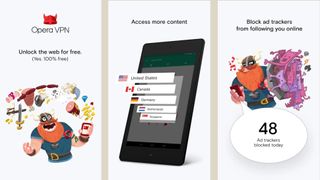
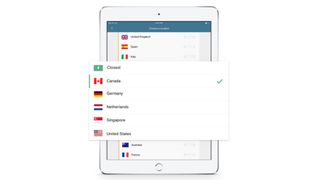
Opera's network looks small, at least initially, with only five regions available: Canada, US, Netherlands, Germany and Singapore. But that should still ensure most users have a location near them, and with more than 500 servers available there's plenty of privacy-preserving capacity here.
The simplest way to access the service is via the Opera browser, which is available for Windows, Mac, Linux, iOS and Android. That's convenient, but it only protects what you're doing in Opera. Other browsers or internet-enabled applications won't be covered.
0
Opera VPN's Android and iOS apps are more capable, encrypting all connections system-wide. Torrents aren't supported, but at least that means there will be more bandwidth available for regular internet applications.
Whatever you're using, there's no need to hand over your email address or create an account. Just install the browser or app on as many devices as you need, and use them all as much as you like, with no limits at all.
A commercial Opera VPN Gold product ramps up the power by offering 10 regions, up to seven times faster speeds and dedicated customer support. While that sounds appealing, it's currently only available for the iOS client and seems relatively expensive at around $30 (around £22) a year. Spending $40 (around £30) a year with Private Internet Access gets you 25 countries, more than 3,000 servers, many more features, and clients for almost everything.
Privacy
Opera VPN has a lengthy privacy policy with several interesting clauses.
For example, apparently the service may collect "usage data, like web addresses (but not content of the web pages) and IP address locations." That's more than most VPNs, but bear in mind that the service isn't associating this with your name, email address or any other personal details. Opera VPN is building browsing histories here, but they're relatively anonymous and can't easily be connected to you.
The mobile app collects device-related data including your device, browser and operating system type, device advertising ID and "IP address with date and time" (presumably your real IP address when you connect to the service). This is more of a fingerprint and can be used to identify a device over time, although again, Opera VPN doesn't have any information on who it belongs to.
Opera VPN uses multiple other services, including Google Analytics, Crashlytics for crash reporting and MixPanel for notifications. None of this involves disclosing personally identifiable information, though, mostly because Opera really doesn't have any.
Other small issues include ads in the mobile app, typically inviting you to install other apps. Do that and you might give away some of your details with the second app, and create a link with your Opera VPN device. But that's no great surprise, and if you ignore the ads, this won't be an issue.
Put it all together and Opera VPN seems to be doing no more than we would expect from a free service: collecting anonymous browsing information to sell or share with others. If absolute anonymity is top of your VPN shopping list then that might be a problem, and you'll certainly get more privacy promises from most of the competition. But if you're just using a VPN to protect your regular browsing or web shopping, and maybe unblocking some websites, Opera's offering should be good enough.
- We’ve rounded up the best free VPN services of 2018
Performance
We began our Opera VPN tests by downloading the latest Windows build of the browser from Opera's download page. Setup only took a moment and there were no installation hassles or complexities to get in our way.
The VPN isn't turned on by default, but that's also easy to fix. Click Menu > Settings > Privacy and Security, check Enable VPN, and Opera immediately connects you to the fastest server for your current location.
Browse to a site and check the address bar. A blue VPN icon tells you the VPN is active. Tap the icon to see your new IP address and the data you've transferred this month. You can also choose a specific region from the five available – Canada, US, Netherlands, Germany and Singapore – or turn the VPN off temporarily, without going back to Settings. It's all very simple and straightforward, and being able to access VPN features from the browser interface is a real usability plus.
Advertisement
Opera VPN's Android app has its own interface, but isn't much more complicated. Choose a region or tell Opera to connect to the closest server and it'll connect with a click. You can then change the region as required in a couple of clicks, or disable the service on demand.
Bonus features include a Wi-Fi Security Check which claims to score your network security. This seems to carry out only very basic tests, though – is the network public or private, is the VPN on or off? – and it didn't tell us anything useful.
An optional Guardian feature tries to block website trackers. The app promised to list threats it had detected, but we saw nothing at all. Maybe we were unlucky, but Guardian doesn't seem to add much to the package.
Our streaming tests found Opera VPN allowed access to some geo-blocked sites. Netflix recognized we were using an "unblocker or proxy" and refused to stream anything, but less well-defended sites, including YouTube and Comedy Central, gave us access right away. (Opera VPN couldn't unblock BBC iPlayer, one of our normal test sites, as it doesn't provide a UK location.)
Speed tests* were even better, in particular when testing Opera VPN's browser on our Windows system. Connecting from the UK to the Netherlands gave us 65-70Mbps on a 75Mbps line, as fast as we could have expected. US connections were inconsistent but never slow at 40-60Mbps. Singapore saw an even wider range of results, from around 30-55Mbps, and upload speeds could be as low at 0.5Mbps, but that's still much better than many commercial services.
As we expected, Opera VPN managed to max out our Android connection with download speeds of around 18Mbps from all locations. We suspect there's going to be plenty of spare capacity to go faster, if your signal and device are up to it.
Our final leak tests were a little more uncertain. Most test sites – ipleak.net, dnsleaktest.com and more – couldn't detect any issues, but doileak.com reported a DNS leak. We're unsure why. You probably won't care if you're just using Opera VPN to access a blocked YouTube clip, but it may be a concern for the more privacy-conscious.
Final verdict
Opera VPN is an excellent free service, easy-to-use and with download speeds that beat a lot of the commercial competition. It's short on locations and may have a DNS leak, but if you're only looking for basic web protection it'll serve you very well.
- The best VPN services of 2018
*Our testing included evaluating general performance (browsing, streaming video). We also used speedtest.net to measure latency, upload and download speeds, and then tested immediately again with the VPN turned off, to check for any difference (over several rounds of testing). We then compared these results to other VPN services we've reviewed. Of course, do note that VPN performance is difficult to measure as there are so many variables.
VIA techradar
Comments
Post a Comment